Page 1 of 7
Newbie Problem - impossible to enter numbers in the sub-tracks (Chance, velocity,...)
Posted: 08 Jan 2026 13:20
by elode
I just subscribed to Radium. So I’m doing my first attempts at note entry, but I have a problem.
To enter the notes, no problem, the keyboard is very efficient (C3, D3,...). On the other hand, I have a problem entering the numbers in the sub-tracks (Velocity, luck,...). No matter how much I put the cursor (framed in red) in the appropriate sub-track, I can’t get anywhere. The number keys on my keyboard are re-entering notes. So basically impossible to enter numeric fields.
No doubt there is an option somewhere to modify this behavior, but I search in aid and in preferences, I find nothing.
What can I do to solve this?
Thank you

My OS is Manjaro Linux with Plasma.
Re: Newbie Problem - impossible to enter numbers in the sub-tracks (Chance, velocity,...)
Posted: 08 Jan 2026 13:59
by kjetil
If you're using the numpad, it won't work, but it doesn't sound like that is the problem.
Is this what happens?
1. Add a note "C-3" on line 1.
2. Move cursor to line 2.
3. Show velocity sub track.
4. Move cursor to the leftmost velocity subtrack, still on line 2.
5. Press the "1" key (on the normal keyboard, not on the numpad)
6. "C-3" is added to line 2.
Re: Newbie Problem - impossible to enter numbers in the sub-tracks (Chance, velocity,...)
Posted: 08 Jan 2026 14:26
by elode

The image represents what I obtain by successively typing the numeric keys of the keyboard in the velocity subtrack (except the first line as you indicated to me. It’s quite particular.
- Sometimes it moves forward by one line, sometimes it stays on the same line and changes the note, sometimes it writes a number, but the number is not the right one.
Re: Newbie Problem - impossible to enter numbers in the sub-tracks (Chance, velocity,...)
Posted: 08 Jan 2026 14:30
by elode
Ah! I see that the image does not appear in the message!
Re: Newbie Problem - impossible to enter numbers in the sub-tracks (Chance, velocity,...)
Posted: 08 Jan 2026 14:40
by kjetil
Can you first open Edit -> Preferences -> Various and enable "Show key codes", and then report back what numbers are reported in the editor when you press the "1" key (the one above Q on a QWERTY keyboard)?
Re: Newbie Problem - impossible to enter numbers in the sub-tracks (Chance, velocity,...)
Posted: 08 Jan 2026 14:42
by kjetil
(You can upload images to the board if you select the "Attachments" tab below the editor)
Re: Newbie Problem - impossible to enter numbers in the sub-tracks (Chance, velocity,...)
Posted: 08 Jan 2026 14:48
by elode
Ok, result : 1 - 2: Up
(when I type "1").
Re: Newbie Problem - impossible to enter numbers in the sub-tracks (Chance, velocity,...)
Posted: 08 Jan 2026 14:52
by elode
1 > 0 - 2: Up (sorry for the precedent mistake)
2 > 0 - 3: Up
3 > 0 - 4: Up
… and so on…
Re: Newbie Problem - impossible to enter numbers in the sub-tracks (Chance, velocity,...)
Posted: 08 Jan 2026 15:02
by kjetil
Yes, that seems correct. I get "0 - 2" too.
Can you confirm or correct this recipe?
1. Add a note "C-3" on line 1.
2. Move cursor to line 2.
3. Show velocity sub track.
4. Move cursor to the leftmost velocity subtrack, still on line 2.
5. Press the "1" key (on the normal keyboard, not on the numpad)
6. "C-3" is added to line 2.
Re: Newbie Problem - impossible to enter numbers in the sub-tracks (Chance, velocity,...)
Posted: 08 Jan 2026 15:06
by elode
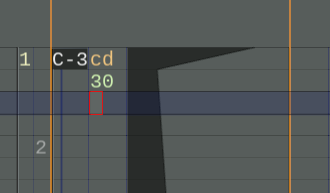
No, the result is "30" in the velocity subtrack (see image attachment)
- Copie d'écran_20260108_160409.png (6.21 KiB) Viewed 413 times