Newbie Problem - impossible to enter numbers in the sub-tracks (Chance, velocity,...)

elode
Posts: 38
Joined: 08 Jan 2026 10:33

Re: Newbie Problem - impossible to enter numbers in the sub-tracks (Chance, velocity,...)

Post by elode »

First :

Code: Select all

1. 6 - 56 Down
2. 0 - 45 Down
Then :

Code: Select all

DEBUG/get_sym: Enter. event->detail: 64
DEBUG/get_sym: Enter. event->detail: 53
DEBUG/keysym_to_keynum: Enter. keysym: 121. XK_1: 49. XK_3: 51
DEBUG/get_sym: Enter. event->detail: 53
DEBUG/keysym_to_keynum: Enter. keysym: 121. XK_1: 49. XK_3: 51
DEBUG/get_sym: Enter. event->detail: 64
elode
Posts: 38
Joined: 08 Jan 2026 10:33

Re: Newbie Problem - impossible to enter numbers in the sub-tracks (Chance, velocity,...)

Post by elode »

For no apparent reason, strangely, everything worked correctly during a Radium launch (letters, numbers...). I was looking forward to it, but, be careful, I close Radium and restart it to check if it’s stable... and no! It came back with the same problem that concerns us.
Damnation!
!!!???
kjetil
Site Admin
Posts: 627
Joined: 20 Jul 2017 20:45

Re: Newbie Problem - impossible to enter numbers in the sub-tracks (Chance, velocity,...)

Post by kjetil »

When you press 'y' in the editor (without left alt), is an A note inserted?

Anyway, I've made a new test version, but I don't have much hope for this one. Need to think more.
Same link: https://radium.dog/radium_64bit_linux-7.5.77.tar.xz
elode
Posts: 38
Joined: 08 Jan 2026 10:33

Re: Newbie Problem - impossible to enter numbers in the sub-tracks (Chance, velocity,...)

Post by elode »

Alas, the problem is still there and, apparently identical.

Sorry :/

When I press the "y" key in the editor, I get D-3, which seems quite logical to me.
kjetil
Site Admin
Posts: 627
Joined: 20 Jul 2017 20:45

Re: Newbie Problem - impossible to enter numbers in the sub-tracks (Chance, velocity,...)

Post by kjetil »

I guess you have a german keyboard? Does it work pressing left alt + z to turn on/off the velocity track? (I doubt it though)

Also, can you try to right-click inside a track, and when the popup menu opens, right-click again the "Velocity text" menu entry, and then select "Change keybinding". In the change keybinding dialog, can you report back what happens when you press Left alt + y? Do you get this result?
Untitled.png
Untitled.png (15.32 KiB) Viewed 262 times
elode
Posts: 38
Joined: 08 Jan 2026 10:33

Re: Newbie Problem - impossible to enter numbers in the sub-tracks (Chance, velocity,...)

Post by elode »

I have several keyboard layouts installed on my system: US layout (QWERTY), FR (AZERTY), and "bépo", which is a layout inspired by Dvorak, but for French. bépo is the layout I I'm using more.
Of course, I tried the different layouts, but that doesn’t change anything about the problem.

Regarding the change of keyboard shortcut for the subtrack "Velocity", here is the result:
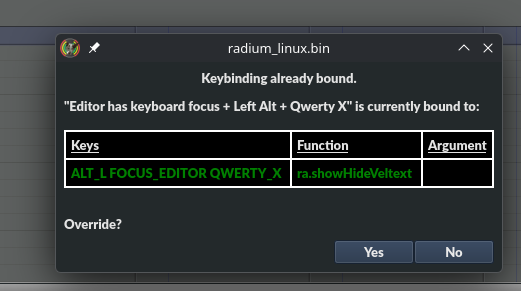
Copie d'écran_20260124_171931.png
Copie d'écran_20260124_171931.png (33.31 KiB) Viewed 260 times
Ah! it seems that the layout I use (bépo) is not taken into account: when I type alt+y in "bépo", I get alt+x in qwerty!

So when I do "alt+y" in qwerty, it works (YES!).

Well... if I have to switch to qwerty to work in radium, it’s not a drama.

On the other hand, the problem remains entire for entering velocities that – regardless of the layout, even in qwerty, continue to modify the notes according to the Radium Piano layout.
kjetil
Site Admin
Posts: 627
Joined: 20 Jul 2017 20:45

Re: Newbie Problem - impossible to enter numbers in the sub-tracks (Chance, velocity,...)

Post by kjetil »

There is one bug as far as I can see: It doesn't work changing keyboard setting after Radium has started.

So if I start radium like this:

Code: Select all

setxkbmap us
./run_radium.sh
Then the Y key in QWERTY will always be an Y, even after I change to a non-QWERTY keyboard.

I've tried both "fr" "fr bepo", and "de", and as far as I can see, everything works as expected, except for the one bug.

Could it be that your system sets keyboard in a different way?
Can you try to run:

Code: Select all

setxkbmap fr bepo
./run_radium.sh
and see if bepo keyboard works as expected then?
kjetil
Site Admin
Posts: 627
Joined: 20 Jul 2017 20:45

Re: Newbie Problem - impossible to enter numbers in the sub-tracks (Chance, velocity,...)

Post by kjetil »

Oh, right, number keys doesn't work with "fr bepo" because you need to press shift.

That's harder to fix properly. But I could make an option to let numbers in the subtrack use scancode instead of xcb symbols. Then you would have a QWERTY keyboard when entering numbers in the sub-tracks. Would that be an acceptable solution?

But all in all, is the latest change is an improvement from the last official release? Should I release a new version with this change?
elode
Posts: 38
Joined: 08 Jan 2026 10:33

Re: Newbie Problem - impossible to enter numbers in the sub-tracks (Chance, velocity,...)

Post by elode »

kjetil wrote: 29 Jan 2026 15:29 There is one bug as far as I can see: It doesn't work changing keyboard setting after Radium has started.

So if I start radium like this:

Code: Select all

setxkbmap us
./run_radium.sh
Then the Y key in QWERTY will always be an Y, even after I change to a non-QWERTY keyboard.

I've tried both "fr" "fr bepo", and "de", and as far as I can see, everything works as expected, except for the one bug.
Hello :)

Code: Select all

setxkbmap fr bepo
doesn’t work. Manjaro Plasma is with "Wayland", not "X".
kjetil wrote: 29 Jan 2026 15:41 Oh, right, number keys doesn't work with "fr bepo" because you need to press shift.
— To my knowledge, all keyboard layouts for the French language require "shift" to type numbers (FR, AZERTY, BÉPO,...). It is also a source of problems sometimes.
kjetil wrote: 29 Jan 2026 15:41 That's harder to fix properly. But I could make an option to let numbers in the subtrack use scancode instead of xcb symbols. Then you would have a QWERTY keyboard when entering numbers in the sub-tracks. Would that be an acceptable solution?
— Yes, I think it would be very nice.
kjetil wrote: 29 Jan 2026 15:41 But all in all, is the latest change is an improvement from the last official release? Should I release a new version with this change?
I don’t see any differences between the stable version and the last version you sent me.

To summarize on my side:
- Alt+Y uses the Y key on the QUEWTY keyboard
- The notes are entered correctly, regardless of the keyboard layout (US, FR or BÉPO)
- On the other hand, it is completely wobbly for the numbers typed in the "Velocity Text" column (even with the qwerty keyboard activated before the launch of Radium) (due to Wayland ?).
elode
Posts: 38
Joined: 08 Jan 2026 10:33

Re: Newbie Problem - impossible to enter numbers in the sub-tracks (Chance, velocity,...)

Post by elode »

Well... I installed the plasma-x11-session package on Manjaro to see if some of the problems would not come from Wayland.

And the situation changes a bit:
– typing numbers in the "Velocity" column no longer poses a problem (even without "shift" with the bépo keyboard layout).
– on the other hand, in the same column "Velocity", the letters "a" to "f" change the note according to the note input layout in the notes column.
Post Reply